
AEVITA Erase Hard Drive
1.1
Size: 1.9 MB
Downloads: 3780
Platform: Windows (All Versions)

Usually, when you delete a file or folder from the Windows system using the Delete button, the data is not actually gone but just hidden. The file or folder which was deleted still remains on the hard disk clusters and can be easily recovered using specialized file recovery software. The data can be completely deleted just by overwriting the clusters, using special tools.
In this way, the files and folders won't be recoverable, no matter what recovery software is used for this purpose. An application which can help you completely remove data from the hard disk is AEVITA Erase Hard Drive.
With this application, you will be able to delete data stored on your hard drive, or on USB storage devices safe in the knowledge that it will never be retrieved again. For this reason, the application uses government and military strength algorithms to completely wipe the data you want to get rid of. The program is useful in the situation when you want to sell your hard disk, but you don't want your deleted data to be recovered and end up on the wrong hands.
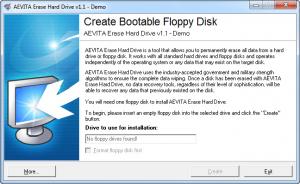
After installing and running the application, the user will need to plug in a floppy disc in order to install the program files. That's because AEVITA Erase Hard Drive works independent of the operating system, thus being able to remove files which are normally being used or protected by Windows.
Pros
It's very simple to use. Besides that, it uses government and military strength algorithms to remove data.

Cons
It requires a floppy disc to be installed, otherwise it won't work. AEVITA Erase Hard Drive allows you to easily remove all the data from the hard disk securely, so that it cannot be recovered later on.

AEVITA Erase Hard Drive
1.1
Download
AEVITA Erase Hard Drive Awards

AEVITA Erase Hard Drive Editor’s Review Rating
AEVITA Erase Hard Drive has been reviewed by Jerome Johnston on 31 Oct 2012. Based on the user interface, features and complexity, Findmysoft has rated AEVITA Erase Hard Drive 4 out of 5 stars, naming it Excellent







